

Description
Lumenare Search upgrades the default WordPress search experience with faster indexed lookups and more control over result quality.
Features include:
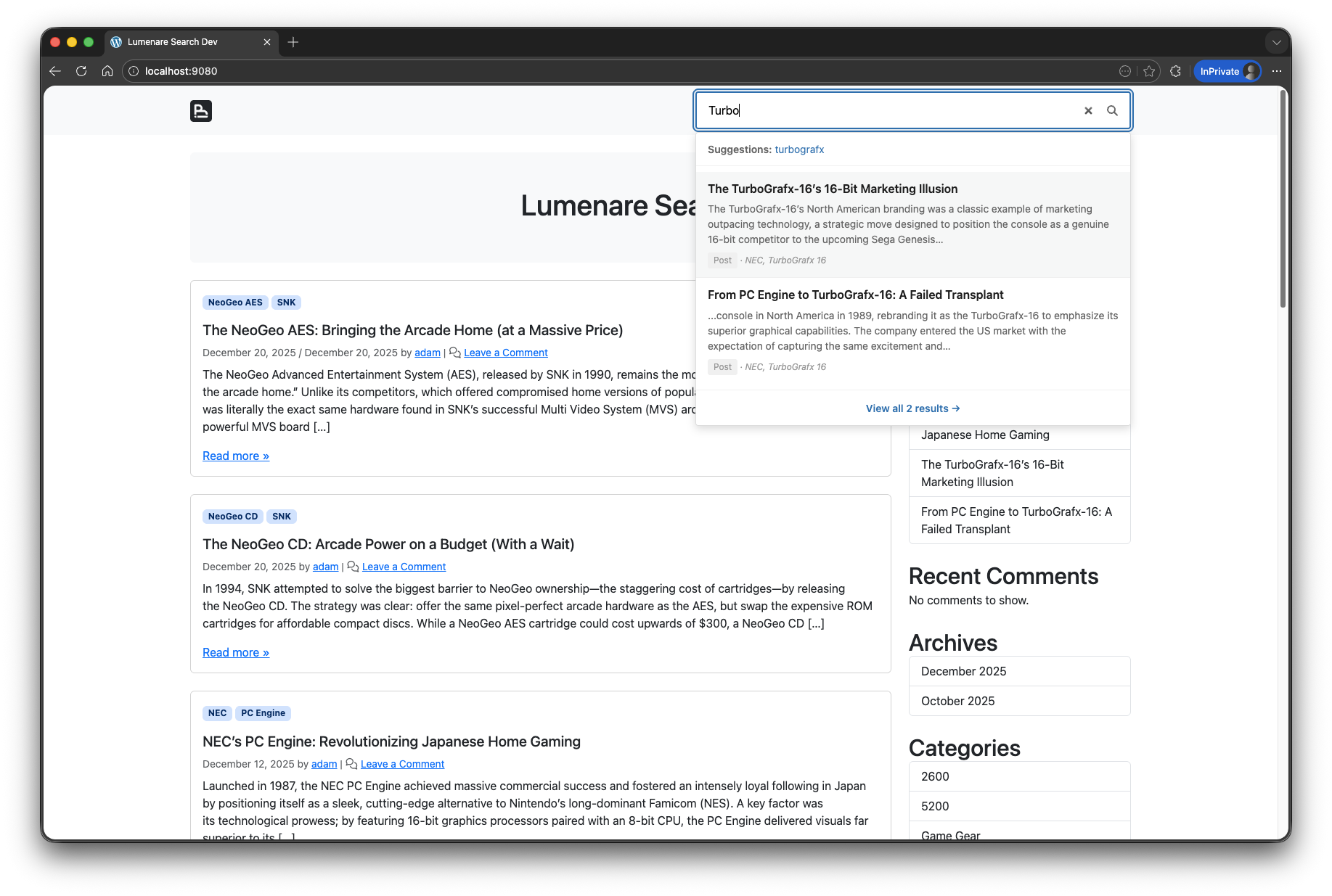
- Instant live search dropdown results, with optional featured-image thumbnails.
- Weighted keyword indexing for titles, excerpts, content, taxonomies, and selected custom fields.
- Match-any or match-all keyword modes.
- Optional fuzzy matching, synonyms, phrase boosting, live trigger delay, and freshness tuning.
- Modular suggestions from analytics, imported migration stats, taxonomies, and index terms, with full post-title suggestions available as an opt-in provider.
- Search result highlighting, taxonomy facets, content-type filters, and date filters.
- Search analytics, click tracking, and trending data.
- Public trending/latest search lists through the Lumenare Search Trends widget and native Gutenberg block.
- Guided setup presets for publishers, commerce sites, knowledge bases, high-volume installs, and contextual ASP migrations.
- Search Intelligence plus contextual Search Imports inside the main Lumenare Search settings screen.
- Ajax Search Pro migration and guarded post-migration cleanup tools when ASP data or leftovers are detected.
- Automatic replacement of default search forms plus shortcode, widget, and block support.
Screenshots

Search quality settings. 
Phrase and fuzzy matching controls. 
Ranking and weighting options. 
Live results, optional thumbnail, and results page display settings. 
Filter controls for content types, taxonomies, and dates. 
Analytics reporting. 
Block theme compatibility. 
Classic theme compatibility. 

Blocks
This plugin provides 1 block.
- Lumenare Search A powerful search block with live results and fuzzy matching.
Installation
- Upload the
lumenare-searchfolder to the/wp-content/plugins/directory. - Activate the plugin through the
Pluginsscreen in WordPress. - Go to
Settings > Lumenare Search. - Review your search settings and click
Reindex All Contentfor the initial index.
FAQ
-
Does this replace WordPress’s default search?
-
Yes. The plugin replaces standard WordPress search forms and also provides a shortcode, search widget, search trends widget, and Gutenberg blocks.
-
Can I display trending or latest searches?
-
Yes. Add the “Lumenare Search Trends” widget or the “Lumenare Search Trends” block to show analytics-backed trending or latest successful searches. Latest searches default to repeated successful queries so one-off private searches are not promoted publicly.
-
Do I need to reindex after changing settings?
-
Usually no for ranking-only changes such as fuzzy matching, synonyms, or phrase boosts. Reindex after changing indexed post types, stop words, or other settings that affect stored index data.
-
Can I search custom post types?
-
Yes. Publicly queryable post types can be enabled from the plugin settings.
-
Does it work with caching plugins?
-
Yes. Live results use AJAX, while normal search result pages can still be cached by your site stack.
-
What happens on uninstall?
-
The plugin removes its custom data when uninstalled.
Reviews
There are no reviews for this plugin.
Contributors & Developers
“Lumenare Search” is open source software. The following people have contributed to this plugin.
Contributors
Translate “Lumenare Search” into your language.
Interested in development?
Browse the code, check out the SVN repository, or subscribe to the development log by RSS.
Changelog
2.1.02
- Fixed automatic new-content reindex scheduling so stale overdue WP-Cron events are repaired and rescheduled.
- Improved WP-Cron schedule labels so bootstrap does not trigger early translation notices.
2.1.01
- Added a configurable Lumenare Search Trends widget for trending or latest public search lists.
- Added a native dynamic Gutenberg block for trending/latest search lists, built with block metadata and server-side rendering.
- Added privacy-minded defaults for latest searches so one-off zero-result queries are not displayed publicly.
- Added an opt-in display setting for showing featured-image thumbnails in live search dropdown results.
- Added live-result image metadata to AJAX payloads when enabled, with cache keys separated between image and text-only dropdown responses.
- Updated live dropdown markup and styles so thumbnail results remain compact and scannable.
- Improved ListenUp audio boost settings so controls appear only when ListenUp is installed, with a contextual WordPress.org install prompt.
2.1.00
- Added automatic new-content partial reindexing with configurable WP-Cron intervals, run status, and safe continuation handling for large catalogs.
- Added guided setup presets for publisher, commerce, knowledge base, high-volume, and Ajax Search Pro migration sites.
- Added Search Intelligence, Search ROI, reviewed/reopen state, exact-query promotions, editable synonym drafts, and remediation outcome tracking.
- Added Ajax Search Pro migration tooling for analytics, impressions, clicks, suggestion seeds, contextual import UI, guarded cleanup tools, and
wp lumenare cleanup asp. - Added native impression tracking, CTR-aware click boosts, source filters, import history, remediation outcomes, and analytics hygiene exclusions.
- Added modular suggestion providers, provider order controls, profile-level overrides, short query-focused defaults, and zero-result suggested-search previews.
- Added generic taxonomy/content-type/date facets with facet limits plus block and shortcode controls for filter placement.
- Added audio attachment ranking boosts with configurable metadata keys and companion-plugin filters.
- Improved WordPress 7.0 and PHP 8.3 compatibility, live search trigger delay controls, and safer bootstrap translation behavior.
- Improved index table resilience with frontend fallbacks, activation/schema-upgrade repair, reindex-required notices, and hard-error reporting for failed index writes.
2.0.03
- Improved keyword suggestions to suppress exact-query echoes and one-off typo artifacts in suggestion lists.
2.0.02
- Fixed partial reindex runs for explicitly selected post types outside the default searchable post type settings.
- Improved partial reindex messaging so zero-match filters stop early instead of reporting “Successfully indexed 0 posts.”
2.0.01
- Improved the index and query engine for better performance on larger sites.
- Added profile-aware search routing for integrations.
- Added telemetry queue and durable security log storage.
1.1.3
- Fixed frontend search block parameters not applying correctly.
- Improved ranking, highlighting, and keyword suggestion quality.
1.1.21
- Fixed database schema upgrades so they run after plugin file updates.
1.1.2
- Added cached live search results and a modern Gutenberg block experience.
1.1.1
- Added canonical keyword storage and better keyword suggestion cleanup.
1.1.0
- Added analytics and more search tuning controls.
1.0.2
- Improved compatibility with non-block themes.
1.0.1
- Added search icon support and cleaner indexed content extraction.
1.0.0
- Initial release.