
Description
Givasso is the donation plugin built for French nonprofits (associations). In minutes, add an online donation form to your WordPress site, run fundraising campaigns and follow every donation from your dashboard.
Features
- Blocks for the WordPress editor — “Donation form”, “Campaign” and “Campaign gauge”: add them like an image, choose the campaign from a list and adjust the settings with a live preview, no code needed
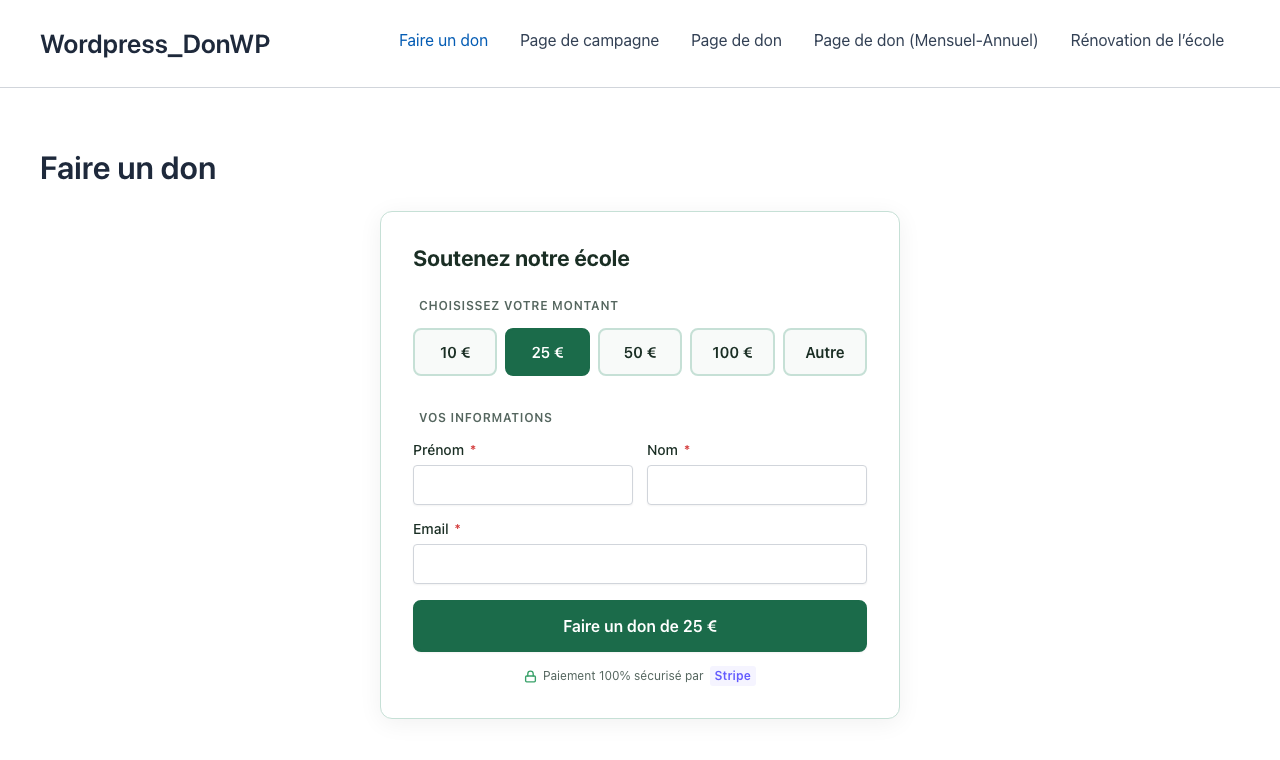
- Donation form — also available as a shortcode for any page builder — 5 themes (Givasso, Classic, Ocean, Sunset, Minimal), 3 layouts (Card, Inline, Flat)
- Your look — main color, corner style and button style, with a live preview
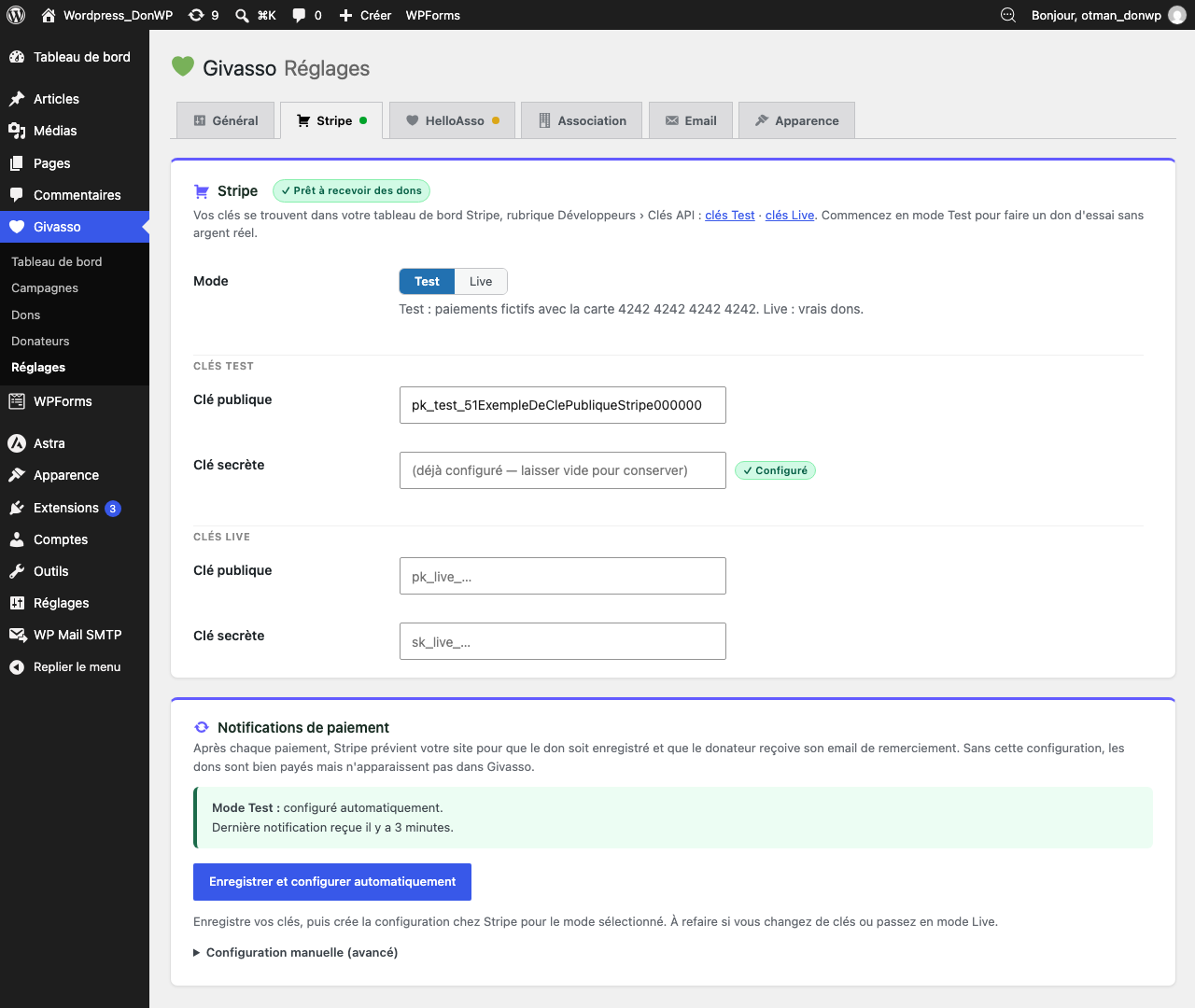
- Stripe — secure card payments via Stripe Checkout, test mode included, payment notifications set up automatically in one click
- Getting started guide — a 5-step checklist on the dashboard that ticks itself as you go, and creates your donation page for you
- HelloAsso — the payment platform used by French nonprofits, with no commission taken on your donations
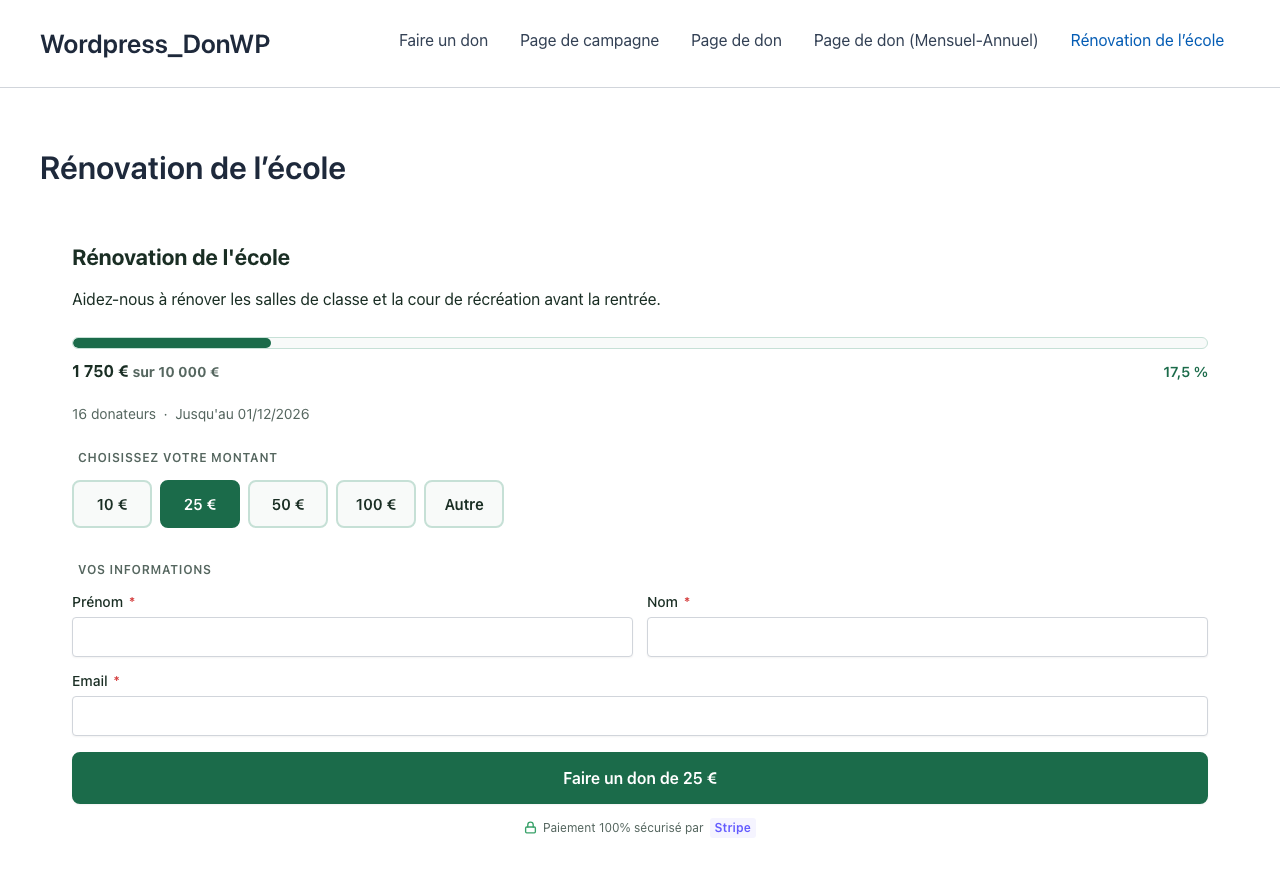
- Fundraising campaigns — goals, dates, progress bars, ready-made campaign block
- Postal address and phone — ask for them only if you need them: hidden, optional or required, set in one click (country list in French, French postcode check, browser autofill)
- Thank-you email — sent automatically to the donor after each confirmed payment, with your own subject, message, logo and color
- Donation alerts — an email to the association (or several people: president, treasurer…) for each new donation, and when a donation is refunded from Stripe or HelloAsso
- GDPR — export or erase a donor’s data from WordPress privacy tools (donations are kept without personal details for accounting), and a suggested privacy policy text
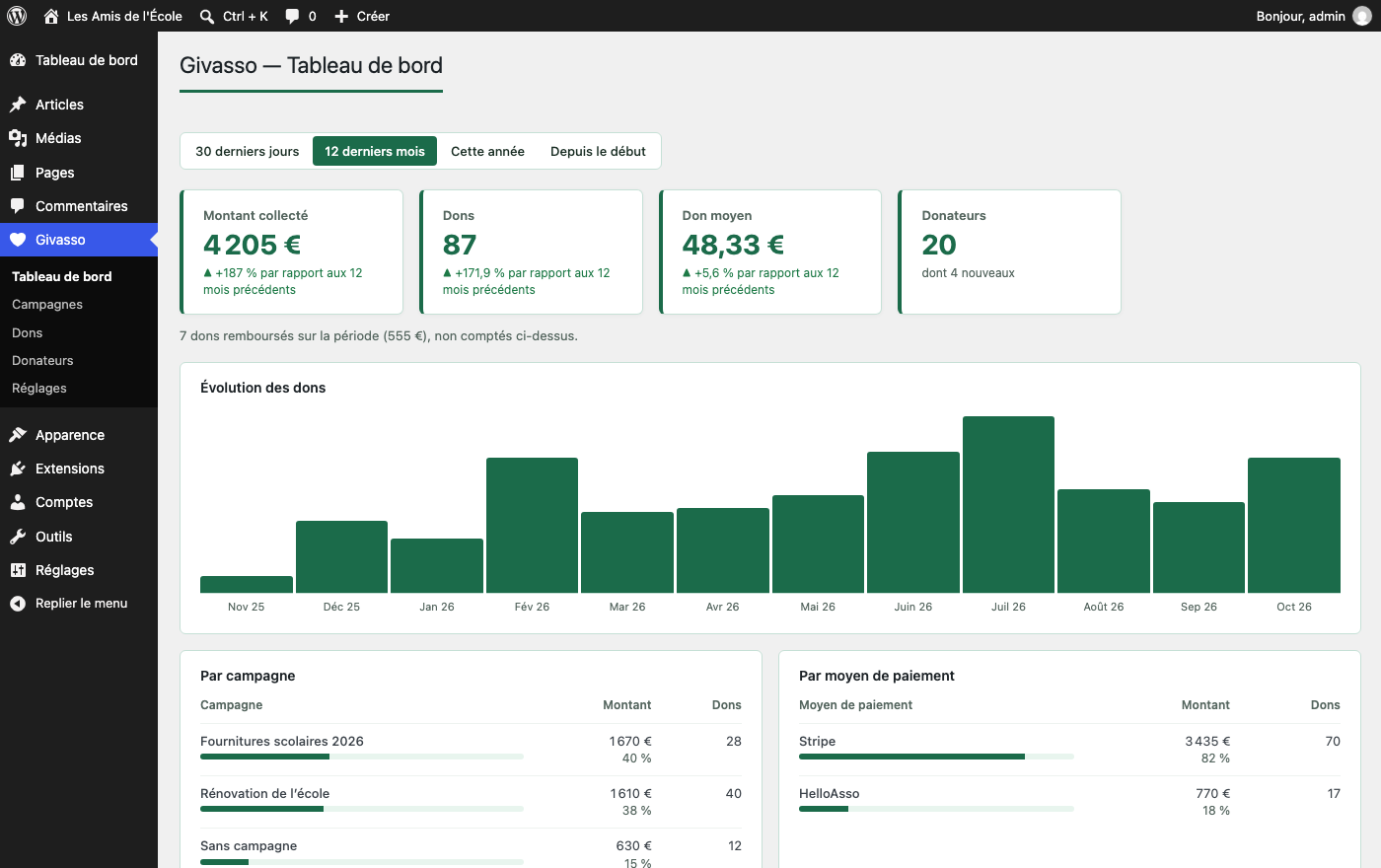
- Statistics — amount raised, number of donations, average gift and new donors over 30 days, 12 months, this year or all time, compared with the previous period, with a chart and a breakdown by campaign and payment method
- Donations and donors — donation list with search and filters (campaign, payment method, status), donor list with search, history and totals
- Stripe refunds from the WordPress admin; HelloAsso refunds are synced automatically
- Theme-friendly — inherits your theme typography; every template can be overridden in your theme
Why Givasso?
- Built for French nonprofits, with native HelloAsso support
- Lightweight — no external libraries, no Composer, no JS framework
- Secure — signed payment notifications, nonces, capability checks, prepared SQL queries, rate limiting on the payment form
- Privacy-friendly — donor data stays in your WordPress database, no tracking or telemetry
Blocks
In the WordPress editor, click + and search for “Givasso” or “don”: Donation form, Campaign (title, description, gauge and form) and Campaign gauge. The main settings of the shortcodes below (amounts, button text, payment method, campaign, layout, colors) are in the block sidebar.
Shortcodes
For page builders (Elementor, Divi…) or the classic editor.
Donation form
[givasso_form]
Available attributes:
Attribute
Default
Values
theme
givasso
givasso, classic, ocean, sunset, minimal
layout
card
card, inline, flat
amounts
10,25,50,100
comma-separated integers
currency
EUR
EUR, USD, GBP, MAD, CHF
campaign
(empty)
campaign slug
title
Faire un don
free text
button_text
Donner maintenant
free text
show_title
yes
yes, no
gateway
(admin setting)
stripe, helloasso
Campaign progress bar
[givasso_total campaign=”my-campaign” display=”bar”]
display accepts `amount`, `count` or `bar`.
Full campaign (progress bar + form)
[givasso_campaign campaign=”my-campaign”]
Customizing templates
Copy any file from the plugin templates/ folder into a givasso/ folder in your theme, keeping the same path. For example:
templates/form/card.phpyour-theme/givasso/form/card.phptemplates/campaign/campaign.phpyour-theme/givasso/campaign/campaign.phptemplates/email/thank-you.phpyour-theme/givasso/email/thank-you.php
Hooks for developers
Givasso can be extended without touching its code. Main hooks:
givasso_loaded(action) — Givasso is ready; register your extension here.- Form:
givasso_form_start,givasso_form_after_amounts,givasso_form_after_donor_fields,givasso_form_before_submit,givasso_form_end(actions, inside the form), and the JavaScript eventsgivasso:validate,givasso:before-submit,givasso:button-label. - Payment:
givasso_checkout_data,givasso_checkout_validation,givasso_pre_checkout_url,givasso_stripe_checkout_params,givasso_helloasso_checkout_params(filters). - Notifications:
givasso_stripe_webhook_events(filter),givasso_stripe_webhookandgivasso_helloasso_webhook(actions, signature already verified). - Donations:
givasso_donation_insert_data(filter),givasso_donation_completedandgivasso_donation_refunded(actions). - Thank-you email:
givasso_send_thank_you_email,givasso_email_placeholders,givasso_thank_you_email(filters). - Email to the association:
givasso_send_admin_notification,givasso_admin_notification_email(filters). - Personal data:
givasso_donor_erased(action, after a donor is anonymized). - Admin:
givasso_admin_menu,givasso_settings_tabs,givasso_settings_saved,givasso_donations_columns,givasso_donors_columns,givasso_dashboard_cards,givasso_dashboard_after_stats. - Other:
givasso_client_ip(real IP behind a proxy),givasso_stripe_webhook_url(public notification URL).
Compatibility
- WordPress 6.0+
- PHP 8.1+
- Stripe API (Checkout Session)
- HelloAsso API v5
- Browsers: Chrome, Firefox, Safari, Edge (last 2 versions)
Privacy (GDPR)
Givasso stores donor personal data (first name, last name, email, donations, and postal address and phone number if the association chooses to ask for them) in the association’s own WordPress database, solely to record donations, manage donors, send the thank-you email and notify the association of new donations. The association is the data controller under GDPR.
Address and phone fields are hidden by default. Following the GDPR data minimisation principle, only enable them if your association needs them.
When a donor asks for their data, use WordPress Tools › Export Personal Data or Tools › Erase Personal Data: Givasso donor details and donations are included. Erasing anonymizes the donor and keeps donation amounts and dates, which the association needs for its accounting. A suggested privacy policy text is available in Settings › Privacy.
Givasso sends no data to the plugin author and collects no telemetry. Data is only transmitted to the payment gateway chosen by the association (Stripe or HelloAsso) to process the payment.
When a donation is confirmed, Givasso sends a thank-you email to the donor through your site’s email system (wp_mail). This email can be disabled in Givasso › Settings › Email.
External Services
This plugin connects to the following third-party services. Their use is subject to their respective terms and conditions.
Stripe
Used for processing card payments, when Stripe is enabled.
* Service: https://stripe.com
* Terms of use: https://stripe.com/legal
* Privacy policy: https://stripe.com/privacy
Data transmitted when a donor starts a payment: the donation amount and currency, the donor’s first name, last name and email, the campaign name if any, and the donor’s postal address and phone number if these fields are enabled (stored as payment metadata, then saved in your WordPress database when the payment is confirmed). Card data is entered on Stripe’s page and never passes through your server.
HelloAsso
Used as an alternative payment gateway for French nonprofits, when HelloAsso is enabled.
* Service: https://www.helloasso.com
* Terms of use: https://www.helloasso.com/cgu
* Privacy policy: https://www.helloasso.com/confidentialite
Data transmitted when a donor starts a payment: the donation amount, your organization slug, the donor’s name and email to prefill the HelloAsso checkout page, and the donor’s postal address and phone number if these fields are enabled (as checkout metadata).
Screenshots
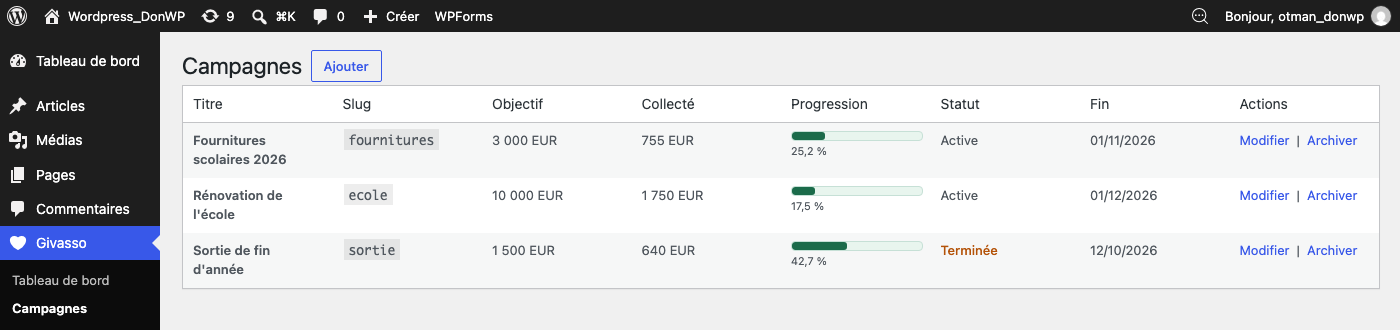
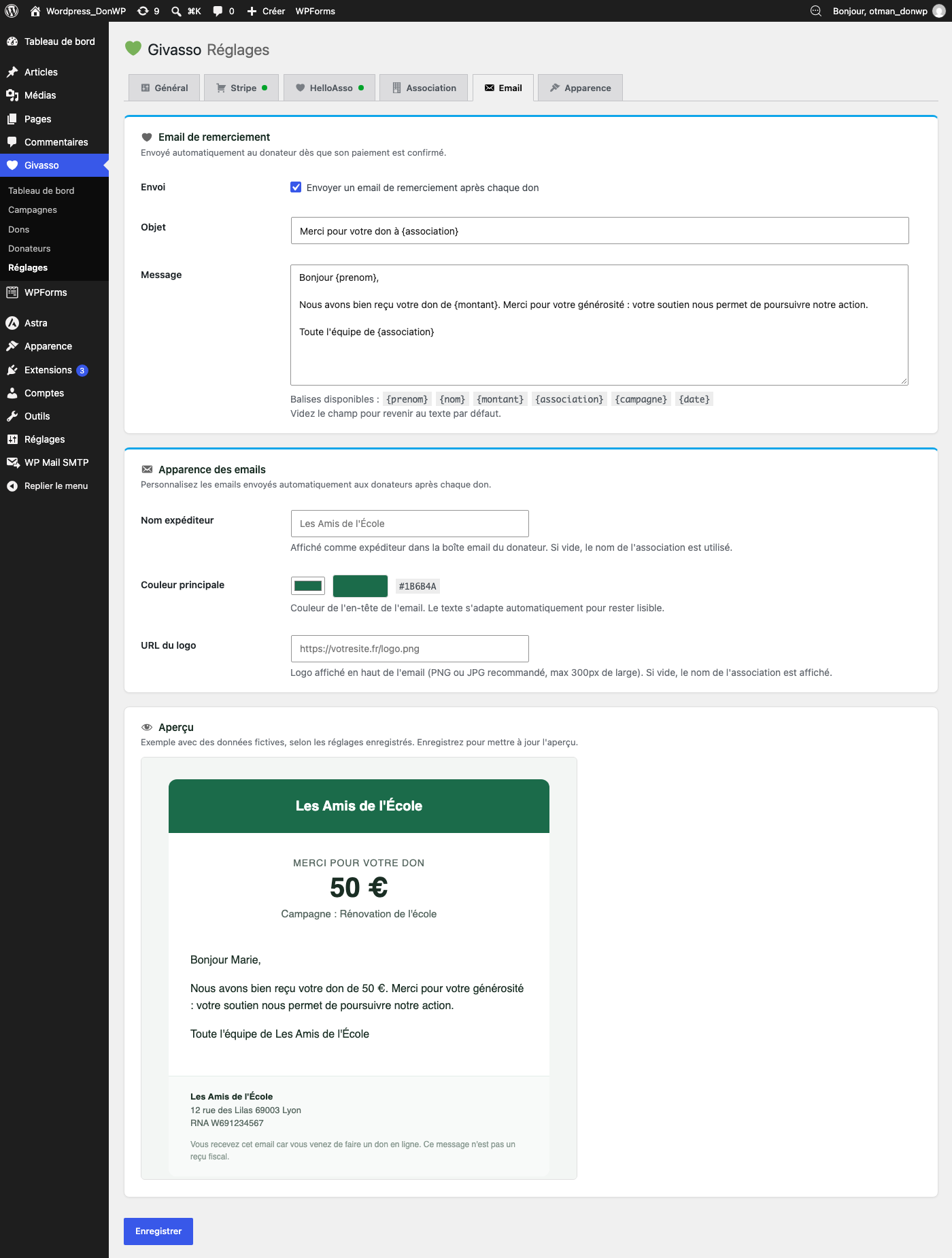
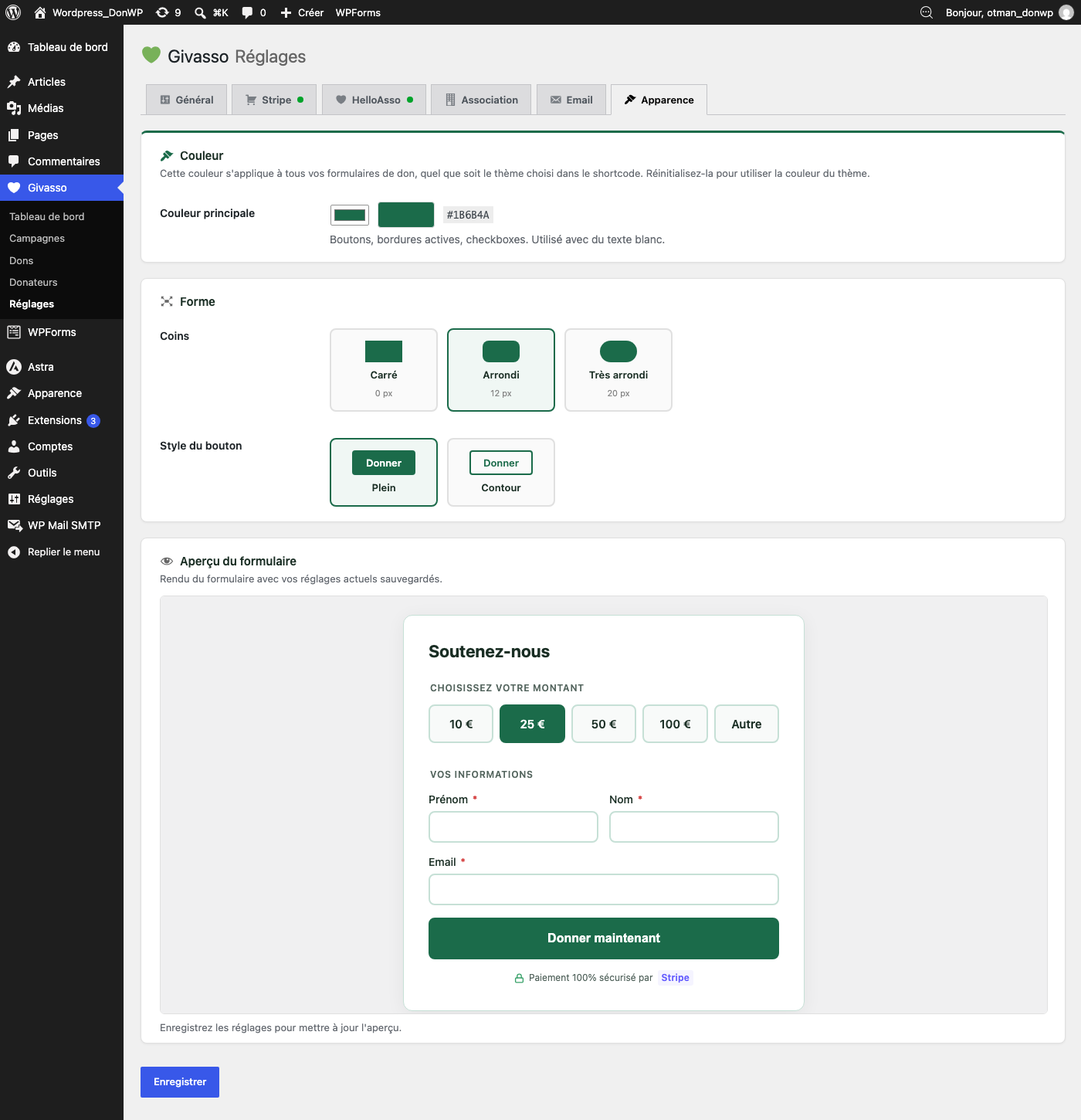
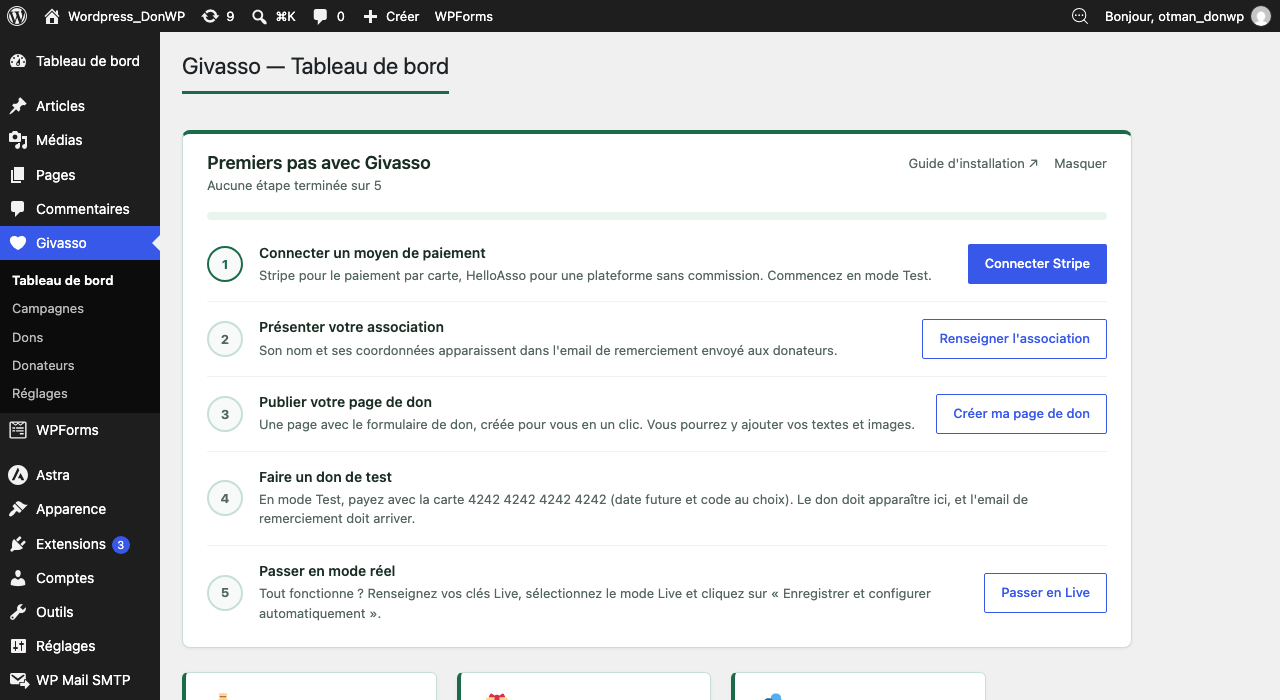
Blocks
This plugin provides 3 blocks.
- Jauge de campagne La jauge d'une campagne Givasso seule (ou le montant collecté, ou le nombre de dons), à placer où vous voulez.
- Formulaire de don Formulaire de don Givasso : montants, coordonnées du donateur et paiement par Stripe ou HelloAsso.
- Campagne Campagne Givasso : titre, description, jauge de progression et formulaire de don.
Installation
- In WordPress, go to Plugins › Add New, search for “Givasso”, then install and activate it
- Open Givasso › Dashboard: the getting started guide walks you through each step
- Connect Stripe: paste your API keys (test mode first) in Givasso › Settings › Stripe and click Save and configure automatically — Givasso creates the payment notifications (webhook) in your Stripe account for you
- Fill in your association details, then click Create my donation page in the guide (or add
[givasso_form]to any page) - Make a test donation with the card
4242 4242 4242 4242, then switch to live mode
Step-by-step guide with screenshots (in French): https://www.givasso.fr/guide-installation.html
Stripe webhook (manual setup)
Automatic setup needs a site reachable from the internet. For a local site, or if you prefer to do it yourself, create a webhook in Stripe › Developers › Webhooks pointing to: https://your-site.com/wp-json/givasso/v1/webhook
Events to enable: checkout.session.completed, charge.refunded. Then paste the signing secret in Givasso › Settings › Stripe › Manual setup, for test and live mode separately.
HelloAsso setup
- In HelloAsso, open My account › Integrations and API and copy your client ID and client secret
- Paste them in Givasso › Settings › HelloAsso and save: Givasso checks the connection and finds your organization automatically
- Back in HelloAsso (My account › Integrations and API), paste the notification URL shown in Givasso settings
- Your site must use HTTPS: HelloAsso refuses payments started from a site without it
FAQ
-
Is the plugin free?
-
Yes. Givasso is free and licensed under the GPL. Only your payment gateway fees apply: Stripe’s transaction fees if you use Stripe; HelloAsso takes no commission on donations.
-
Does HelloAsso charge commissions?
-
No. HelloAsso is free for French nonprofits. Donors may optionally leave a voluntary contribution to HelloAsso during payment.
-
Does Givasso issue tax receipts?
-
No. Givasso records donations and sends a thank-you email, which is not a tax receipt.
-
Can I have multiple forms on the same page?
-
Yes. Each shortcode generates an independent form with unique identifiers.
-
Can I customize the form design?
-
Yes. Choose from 5 built-in themes and 3 layouts, set your colors, corners and button style in Givasso › Settings › Appearance, or override the templates in your theme (see “Customizing templates”). The
flatlayout (no card, transparent background) blends into any design. -
Can I ask donors for their postal address or phone number?
-
Yes, in Givasso › Settings › General › Information requested from donors. Each one can be hidden (default), optional or required. Every extra field makes the form longer, so only ask for what your association really needs. The address and phone number appear in Givasso › Donors.
-
Can I turn off the thank-you email?
-
Yes, in Givasso › Settings › Email. You can also edit its subject and message, and use the tags
{prenom},{nom},{montant},{association},{campagne}and{date}. -
A donation was paid but does not appear in Givasso. Why?
-
Givasso records a donation when Stripe notifies your site that the payment succeeded. In Givasso › Settings › Stripe, check that payment notifications are configured for the current mode (Test or Live) and look at “Last notification received”. If needed, click Save and configure automatically again.
-
The thank-you email does not arrive. What can I do?
-
Givasso uses your site’s email system. If your site’s emails end up in spam or are not delivered, install an SMTP plugin to send emails through your email provider.
-
Is the data secure?
-
All SQL queries use
$wpdb->prepare(). Output is escaped. Forms are protected by nonces and rate limiting. Stripe notifications are verified by HMAC-SHA256 signature. HelloAsso notifications are verified by signature or HelloAsso’s IP address, or else each payment is confirmed directly with the HelloAsso API before being recorded (sites behind Cloudflare or a proxy). -
Does it work with WooCommerce?
-
Givasso is independent of WooCommerce. Both plugins can coexist without conflict.
Reviews
There are no reviews for this plugin.
Contributors & Developers
“Givasso” is open source software. The following people have contributed to this plugin.
Contributors
Translate “Givasso” into your language.
Interested in development?
Browse the code, check out the SVN repository, or subscribe to the development log by RSS.
Changelog
1.6.0
- Added: “Donation form”, “Campaign” and “Campaign gauge” blocks for the WordPress editor, with a live preview and all settings in the sidebar (amounts, button text, payment method, campaign, layout, colors). No build step, compatible with WordPress 6.0 and later
- Added: the “Create my donation page” button of the getting started guide now creates the page with the Donation form block
- Fixed: a custom button text was replaced by “Faire un don de 25 €” as soon as an amount was selected; it is now kept before the amount (“Je donne 25 €”)
- Improved: the campaign gauge shows the amount as “350 €” in the campaign currency
- Shortcodes keep working as before
1.5.0
- Improved: donation list — search by name or email, filter by campaign and payment method, new Campaign and Payment columns, donation count, amounts shown as “50 €”
- Improved: donor list — search by name, email or city, and pages of 25 donors
- Improved: campaigns — explanation and “Create my first campaign” button when there is none, “Copy the code” to show a campaign on a page, “View donations” link, clearer status help; new campaigns are active by default
- Improved: dashboard — on a new site, a single message replaces the empty statistics until the first donation
- Improved: HelloAsso settings — 3-step guide with a link to your HelloAsso space, credentials first, organization found automatically, signature key moved to advanced settings
- Improved: plain-language settings (payment method, association details)
- Fixed: the association settings mentioned tax receipts, which the plugin does not issue
1.4.0
- Added: email to the association for each new donation (amount, donor, campaign, payment method, address and phone if collected), with a “View donations” button; reply to it to write to the donor directly. Enabled by default, recipients set in Settings › Email (several addresses allowed)
- Added: email to the association when a donation is refunded from Stripe or HelloAsso
- Added: GDPR — Givasso donor data in Tools › Export Personal Data and Tools › Erase Personal Data. Erasing anonymizes the donor (name, email, address, phone) and keeps donation amounts and dates for the association’s accounting
- Added: suggested text for your privacy policy (Settings › Privacy)
- Added:
givasso_send_admin_notificationandgivasso_admin_notification_emailfilters,givasso_donor_erasedaction
1.3.1
- Fixed: HelloAsso donations were not recorded on sites behind Cloudflare or a proxy — Givasso now confirms each payment directly with HelloAsso when the notification cannot be checked by IP address
- Fixed: HelloAsso notification signatures are read from the header HelloAsso actually sends (
x-ha-signature) - Fixed: when HelloAsso rejects the donor’s name (for example “Test”, digits, or the same first and last name), the payment is still created and the donor types their name on the HelloAsso page
- Improved: saving the HelloAsso settings checks your credentials and fills in your organization automatically
- Improved: clear warning when the site is not in HTTPS (required by HelloAsso), clearer notification instructions, and a “last notification received” indicator
- Improved: switching between HelloAsso Sandbox and Live no longer reuses an access token from the other mode
- Fixed: on small screens, the last date of the dashboard chart could overflow by one pixel
- Tested with a real payment and a real refund in the HelloAsso sandbox
1.3.0
- Added: statistics on the dashboard — choose 30 days, 12 months, this year or all time; amount raised, donations, average gift and donors (with new donors), compared with the previous period
- Added: donations chart (day by day or month by month), readable by screen readers
- Added: breakdown of donations by campaign and by payment method
- Added: amounts in different currencies are never added together; choose the currency when you receive several
- Added: refunded donations are shown separately and no longer counted in the totals of the period
- Added: hooks for developers on the form, the payment, payment notifications, donations, refunds, the thank-you email and the admin pages (see “Hooks for developers”)
- Improved: the dashboard total uses the same amount format as the emails (50 € instead of 50,00 €)
1.2.1
- Fixed: Stripe notifications are still accepted while a webhook secret is being rotated (several signatures in one notification)
- Fixed: the campaign progress bar now has an accessible name for screen readers
- Fixed: the Stripe and HelloAsso payment badges now meet WCAG AA colour contrast
- Fixed: the amount passed to the
givasso_donation_completedhook is always a decimal number - Improved: automated tests (unit, integration in WordPress, real test payments in a browser) run before every release
1.2.0
- Added: one-click Stripe setup — “Save and configure automatically” creates the payment notifications (webhook) in your Stripe account and stores its secret, with clear messages if something is wrong (invalid key, local site, live mode without HTTPS)
- Added: getting started guide on the Givasso dashboard: 5 steps that tick themselves, with a button that creates your donation page
- Added: separate webhook secrets for test and live mode, and a “last notification received” indicator
- Added: welcome message on the Plugins screen after the first installation
- Added:
givasso_stripe_webhook_urlfilter - Improved: Stripe status shows “Notifications to configure” when keys are set but donations could not be recorded yet
1.1.0
- Added: optional postal address (street, additional line, postcode, city, country) and phone fields, each hidden, optional or required (Settings › General)
- Added: country list in French with France first, French postcode check, browser autofill support
- Added: address and phone shown in Givasso › Donors, updated with the latest values when a donor gives again
- Added:
donor_detailsin thegivasso_donation_completedaction data - Fixed: “100 €” no longer wraps onto two lines in the inline layout
- Improved: HelloAsso payment notifications read checkout metadata from either location
1.0.2
- Fixed: after paying, donors now come back to the donation form page and see the thank-you message (they were sent to the home page with no confirmation when no success page was set)
- Fixed: donors who cancel the payment also come back to the form page by default
- Security: the return page must belong to the site
1.0.1
- Added: thank-you email sent to the donor after each confirmed donation (subject, message, logo and color customizable, live preview in settings)
- Added:
givasso_donation_completedaction andgivasso_send_thank_you_emailfilter - Fixed: the form no longer inherits theme styles that broke its layout (borders, button colors, input backgrounds), e.g. with Twenty Twenty-One or GeneratePress
- Fixed: styles now load for every shortcode:
[givasso_total]alone,[givasso_campaign]for an ended campaign or withshow_form="no", and forms inside page builders (Elementor) - Fixed: styles load in the page head when the content contains a Givasso shortcode (no flash of unstyled form, cache/minify friendly)
- Fixed:
[givasso_campaign]now uses the Givasso theme by default, like[givasso_form] - Fixed: form templates can now be overridden in the theme, as documented (
your-theme/givasso/form/) - Improved: 16px input text to prevent automatic zoom on iPhone
- Fixed: uninstall now removes all Givasso data (campaigns table, HelloAsso, email and appearance settings)
- Fixed: plugin description and readme listed features that are not part of Givasso
- Removed: placeholder admin pages for features that are not available
- Tested with WordPress 7.1
1.0.0
- Added:
flatlayout — card-less form with transparent background - Added: automatic theme typography inheritance (
font-family: inherit) - Improved:
[givasso_campaign]— integrated form automatically usesflatlayout - Improved: dynamic CTA button — displays “Donate XX €” based on selected amount
- Improved: “100% secure payment” badge colored by gateway (purple Stripe, red HelloAsso)
- Fixed:
gatewayandfrequencyshortcode attributes silently ignored - Fixed: default theme corrected to
givasso(wasclassicin ShortcodeManager) - Added: Stripe refund from admin +
charge.refundedwebhook - Added: rate limiting 5 req/min/IP (dual backend: object cache or transients)
0.7.0
- Added: fundraising campaigns with goals, dates and progress gauges
- Added:
[givasso_campaign]and[givasso_total display="bar"]shortcodes
0.4.0
- Added: HelloAsso gateway (OAuth2, checkout intent, HMAC webhook)
- Added: HelloAsso settings in admin
- Added:
gatewayshortcode attribute (stripe,helloasso) - Fixed: WordPress user-agent blocked by Cloudflare — replaced with
Givasso/1.0
0.1.0
- Initial release
- Donation form (shortcode, 4 themes, 2 layouts)
- Stripe gateway — Checkout Session + webhook
- Admin dashboard
- MySQL tables: donors, donations